
A Creator Desk Setup Example That Works Beautifully
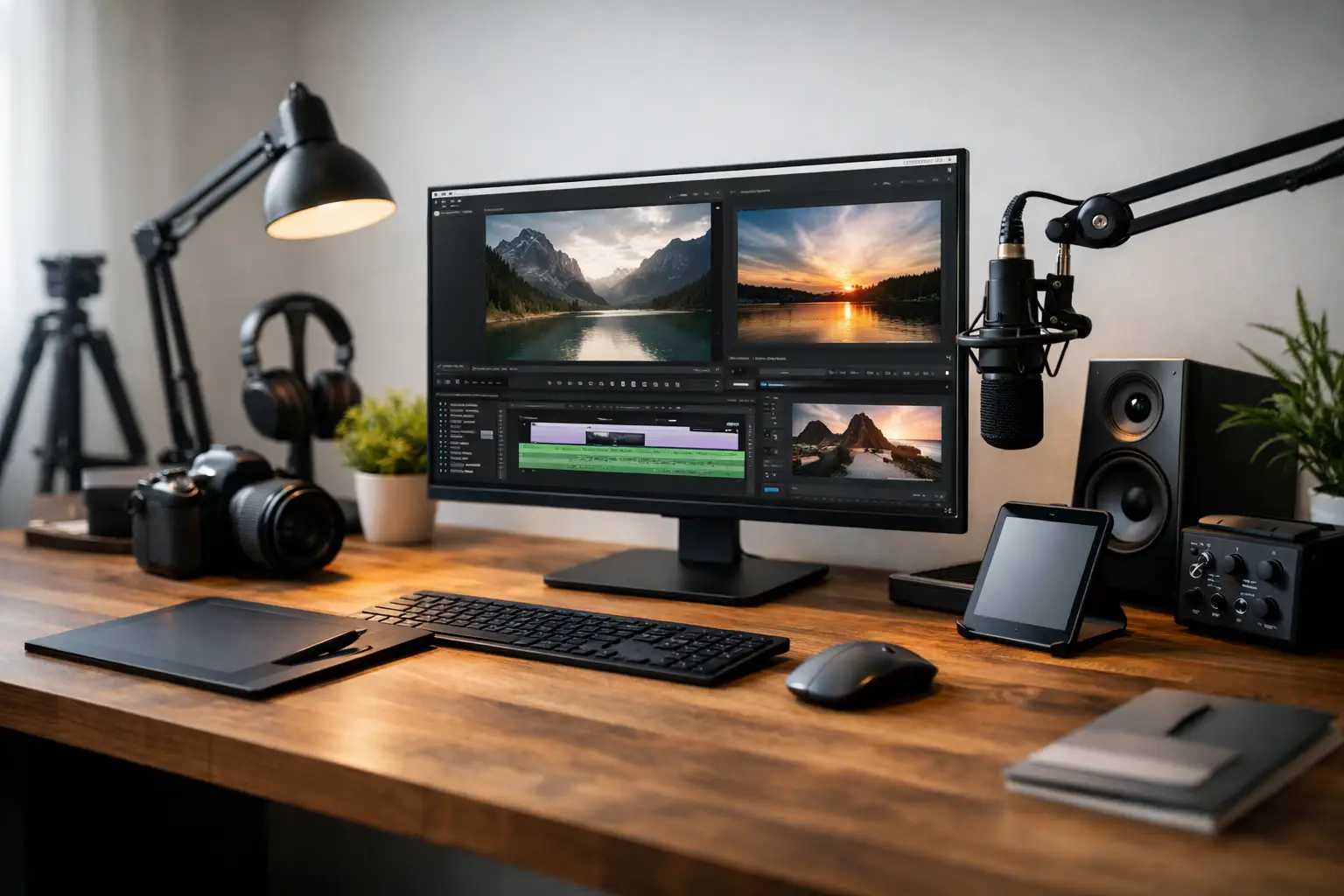
A great creator desk setup example is not a showroom filled with expensive gear. It is a considered workspace where your camera, computer, lighting, and daily essentials feel intentional – and where creating content feels easier to begin. Whether you film product reviews, edit short-form video, host meetings, design graphics, or build a side business after work, the right desk can make your routine look more polished and perform more efficiently.
The most appealing setups balance three things: visual presence, practical workflow, and personal comfort. That balance looks different in a compact apartment than it does in a dedicated studio, but the principles stay the same. Start with how you create, then choose pieces that support the work without crowding the frame.
A Creator Desk Setup Example for Work and Content
Picture a warm, refined desk scene with a light oak or matte black desk positioned near a window. A slim monitor sits at eye level on a clean stand, while a laptop rests to one side on a riser for a second screen or quick access to notes. A compact wireless keyboard, ergonomic mouse, and softly textured desk mat establish a quiet visual foundation rather than competing for attention.
A small adjustable LED light stands just beyond the monitor, angled toward the creator rather than directly at the wall. On the opposite side, a minimal phone mount is ready for vertical filming. Below the desk, a cable tray keeps power cords off the floor, while a narrow rolling drawer unit stores batteries, microphones, chargers, and the less photogenic tools that still need to be within reach.
Finish the setting with one or two elevated details: a sculptural lamp, a low-maintenance plant, a framed print, or a tray for headphones and notebooks. The result is content-ready without looking like a production warehouse. It can appear professional in a video call, flexible enough for filming, and comfortable enough for a long editing session.
Begin With the Desk, Not the Accessories
It is tempting to start with lights, microphones, and visually impressive tech. The desk itself deserves more attention. Its depth determines whether you can place a monitor at a comfortable distance while leaving room for a keyboard and camera. Its width determines whether you have a true work zone and a separate filming zone.
For most creators, a desk around 48 to 60 inches wide provides generous room without taking over a bedroom or living area. A depth of 24 inches can work for a laptop-centered setup, but 28 to 30 inches feels noticeably more luxurious when you use a monitor, keyboard, and camera. If space is tight, a wall-mounted monitor arm can recover valuable surface area.
Material changes the mood. Natural wood brings warmth to lifestyle, beauty, and home-focused content. A white surface creates a bright, clean setting for product demonstrations, though it can show clutter quickly. Matte black feels sleek and tech-forward but often benefits from softer lighting and lighter accessories. Choose the finish that supports your visual identity, not just the trend currently filling your social feed.
Create Zones That Keep Your Frame Clean
The best desks are organized around purpose. Your primary zone should be reserved for the task you do most: editing, writing, designing, or managing your business. Keep the display, keyboard, mouse, and daily notebook here. This is the area that should remain comfortable for hours.
Next, designate a capture zone. It may be a clear corner of the desktop, a small side table, or a movable surface positioned near your best light. This is where you can set down a product, record overhead footage, or place a phone tripod without dismantling your entire workstation.
Finally, build a utility zone for charging and storage. A drawer, pegboard, or rolling cart can hold memory cards, cables, microphones, skincare props, backdrops, and portable power. Keeping these items visible only when needed creates a more premium look and saves time when you are ready to work.
This zoning approach is particularly valuable for creators with limited square footage. A single desk can support content creation and a traditional workday, as long as each activity has a defined place to land.
Lighting Is More Valuable Than Extra Decor
Decor gives a setup personality. Lighting gives it credibility. A well-positioned light improves video quality, makes video calls more flattering, and turns ordinary desk details into a more intentional scene.
If possible, place your desk perpendicular to a window. Side light is often easier to control than harsh light directly behind or in front of you. Then add an adjustable LED light with variable brightness and color temperature. A neutral daylight setting can feel crisp for tutorials and product content, while a slightly warmer tone may better suit relaxed lifestyle footage.
Avoid relying on a single overhead ceiling light. It can create deep shadows under the eyes and cast an unflattering, flat look across the desk. A desk lamp adds atmosphere, but it should be treated as an accent rather than your main filming light. If you create after sunset, a dedicated key light is one upgrade that genuinely earns its place.
Choose Tech That Serves Your Actual Workflow
A premium setup is not defined by the largest monitor or the most devices. It is defined by technology that removes friction. For a writer or social media manager, a laptop stand, external keyboard, and dependable webcam may be enough. For a video editor, a color-accurate monitor, external drive, and ergonomic mouse can have a more meaningful effect than decorative upgrades.
Think carefully about what stays on the desk. A second monitor can increase productivity, but it can also dominate a small frame and make a workspace feel corporate rather than creative. A monitor arm offers a smart compromise because it allows you to reposition the screen for work, filming, or a cleaner background.
Portable power is another understated luxury for creators who move between rooms, travel, or work through unpredictable schedules. A reliable charging solution keeps phones, lights, earbuds, and accessories ready without turning every visible outlet into a tangle of cables.
At Bluurban, the strongest creator spaces are imagined as complete lifestyle environments: technology chosen for convenience, home pieces selected for visual calm, and accessories that make daily routines feel more considered.
Comfort Protects Your Creative Momentum
A visually striking desk is not successful if it leaves you with shoulder tension after an hour. Start with chair height. Your feet should rest comfortably on the floor or a footrest, and your elbows should sit near a 90-degree angle when typing. Position the top of your monitor around eye level to reduce the urge to bend your neck forward.
A supportive chair is a worthwhile investment, but it does not need to look clinical. Today’s home-office options can bring texture, tailored upholstery, and a more residential feel to a creator corner. If you prefer a statement chair for filming, consider pairing it with a discreet ergonomic cushion or alternating with a more supportive seat for editing sessions.
A sit-stand desk can be useful for creators who spend long periods planning, responding to messages, and editing. Still, it is not essential for everyone. If you have a small budget, prioritize a stable desk, comfortable chair, and correct monitor placement first.
Edit the Background Like a Set Designer
What appears behind you can shape how your work is perceived. A few intentional pieces communicate taste and personality. Too many pieces can look distracting, accidental, or difficult to maintain.
Aim for depth rather than density. A lamp or plant placed a few feet behind the desk can create dimension on camera. One shelf with books, ceramics, or carefully chosen objects feels more elevated than several crowded surfaces. Use a consistent palette – perhaps soft neutrals with black accents, warm wood with cream textiles, or white with subtle metallic details.
If your content changes often, keep the foundation neutral and swap smaller accents by season or campaign. This gives your videos a fresh feel without requiring a full redesign. For product-focused creators, neutral backgrounds also help the item remain the star.
Build It in the Right Order
The most satisfying setups are rarely purchased all at once. Begin with the desk, chair, and lighting. Add the monitor arrangement and cable management next, then refine storage and background details. This order protects your budget because it solves the essentials before you buy accessories that only look good in a cart.
Leave breathing room on the desktop. An open surface is not wasted space – it is where spontaneous ideas become product shots, notes become scripts, and a quick recording can happen before the moment passes. Your creator desk should feel polished enough to be seen, but flexible enough to be used every day.
Let your setup evolve with your work. The most compelling workspace is not the one that copies someone else’s studio perfectly; it is the one that makes your next idea feel easy to create.









Leave a comment