
Home Office Lighting Setup That Works Harder
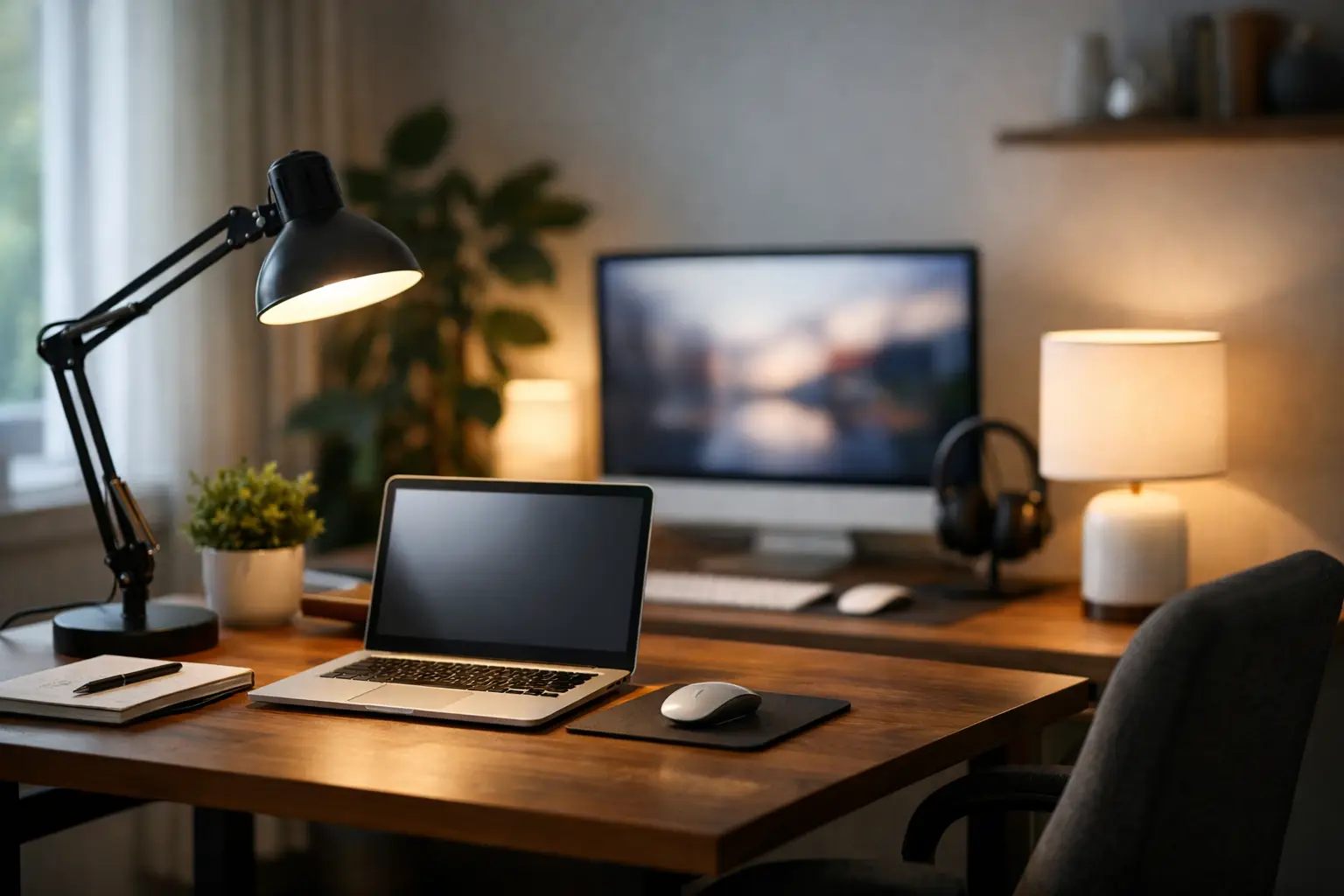
The right home office lighting setup does more than make a desk look polished. It changes how long you can focus comfortably, how confidently you appear on video calls, and whether your workspace feels like a considered part of your home rather than a temporary corner with a laptop. The goal is not a brighter room at any cost. It is layered light that supports the way you actually work.
A premium-looking office rarely depends on one dramatic fixture. It comes from balancing daylight, ambient illumination, targeted task lighting, and a flattering light source for calls. Once those roles are clear, even a compact apartment workspace can feel composed, productive, and quietly elevated.
Start Your Home Office Lighting Setup With the Room
Before choosing a desk lamp or smart bulb, look at where the desk sits in relation to the windows. Natural light is the most valuable starting point, but placement determines whether it works for you or against you.
A desk positioned perpendicular to a window is usually the sweet spot. Daylight reaches the workspace from the side, reducing harsh contrast on the screen while avoiding the washed-out look that comes from sitting directly in front of a window. If the window is behind you, it may make your face look dark on video calls. If it is directly in front of you, glare and squinting can become a daily distraction.
This is where window treatments earn their place. Sheer curtains or adjustable shades soften strong afternoon sun without turning the office into a cave. They also help create a more refined backdrop, especially in multipurpose rooms where the office is visible from the living area.
Daylight changes by season, weather, and time of day, so it should never be the only light source. Think of it as the best layer in the room, not the entire plan.
Build Light in Three Useful Layers
The most comfortable workspaces use separate layers of light. Each one solves a different problem, and together they create depth that a single overhead fixture cannot deliver.
Ambient light makes the room feel complete
Ambient light is the general illumination that lets you move through the room comfortably. It might come from a ceiling fixture, a floor lamp, recessed lights, or a well-placed wall sconce. Its job is to reduce the sharp jump between a bright monitor and a dark surrounding room.
If your office has only an overhead light, assess its quality before adding more fixtures. A dimmable ceiling fixture with a diffuser can be highly effective. A bare, cool-white bulb directly above your chair may create shadows under the eyes, glare on the desk, and an overly clinical atmosphere.
For most home offices, warm-neutral light in the 3000K to 4000K range offers the best balance. Around 3000K feels inviting and residential, making it ideal for an office that shares space with a bedroom or den. Around 4000K looks crisper and can suit detailed work, but it may feel less relaxed after dark. The right choice depends on the room’s finishes, daylight exposure, and how late you tend to work.
Task light puts brightness exactly where you need it
A desk lamp is not merely an accessory. It is the workhorse of the setup, giving you controlled light for notes, keyboard work, sketching, packaging, reading, or any task that takes your eyes away from the screen.
Choose an adjustable lamp with a shade or directional head so the light lands on the desk instead of your monitor. Right-handed users generally benefit from placing it to the left, while left-handed users should place it to the right. That simple adjustment minimizes hand shadows when writing.
Look for a lamp with a dimmer and a high color rendering index, ideally 90 CRI or above. High-CRI lighting renders colors more faithfully, which matters for creators, designers, beauty routines, product photography, and anyone who wants their materials to look true to life. It also gives wood, metal, art, and décor a more expensive, natural appearance.
Avoid placing a bright lamp directly behind the monitor, where it can reflect off the display. A soft bias light behind the monitor can be useful, but it should be subtle. The purpose is to ease contrast, not add a glowing halo that competes with your work.
Face light elevates your presence on camera
If meetings, content creation, or client calls are part of your routine, dedicated face lighting can make a striking difference. The most flattering option is usually a soft, diffused source placed in front of you and slightly above eye level. It should illuminate both sides of the face without creating hard shadows.
A compact LED panel with adjustable brightness and color temperature often offers more control than a traditional ring light. Ring lights can work well in small spaces, but their circular reflection may be noticeable in glasses. A soft panel, placed just off to one side of the camera, often gives a more natural result.
Match the color temperature of your face light to the room whenever possible. Mixing a very cool video light with warm lamps in the background can make skin tones look uneven and the space feel visually disconnected. A subtle, coordinated palette reads as more intentional.
Choose Bulbs for Comfort, Not Just Brightness
Lumens measure brightness, while kelvins describe color temperature. Both matter, but neither tells the whole story. A high-lumen bulb may be perfect for a large office with dark walls and still feel excessive in a sunlit nook with pale finishes.
As a starting point, a desk lamp with roughly 450 to 800 lumens provides useful task illumination for many people. Larger rooms need more ambient output, especially if the overhead fixture is the main source of evening light. The best approach is adjustable lighting rather than one fixed level.
Dimmable LED bulbs are an easy upgrade because they use less energy, last longer, and make it possible to shift the mood from focused work to after-hours calm. Pair them with compatible dimmers. Not every LED bulb performs well with every dimmer, and flickering is an unwelcome trade-off in a space built for concentration and video calls.
Also consider flicker-free lighting if you spend long hours at your desk or record video. Some low-quality LEDs flicker in ways that are difficult to see but can appear on camera or contribute to visual discomfort. Product specifications that mention flicker-free performance are worth prioritizing.
Design Around Screens, Glasses, and Reflective Surfaces
A beautiful lamp is not a good office lamp if it creates glare. Before committing to placement, sit in your normal working position and view the monitor when lights are on. Notice reflections from the lamp, ceiling fixture, windows, framed art, or glossy furniture.
Tilt the monitor slightly downward, position it perpendicular to windows, and keep the brightest sources out of its direct reflection path. If you wear glasses, test your video-call lighting from camera view. A light that looks perfect in the room can still create distracting reflections on lenses.
Matte surfaces can help. A low-gloss desk pad, matte monitor accessories, and a fabric or paper-shaded lamp all diffuse visual noise. These small choices contribute to a workspace that feels calmer and more sophisticated, particularly when the office shares visual space with the rest of the home.
Make the Lighting Fit Your Workday
The most stylish setup is one you will actually use. Put lamps on accessible switches, use smart plugs or smart bulbs for scenes, and create a few simple settings that match your schedule. A bright morning scene can support planning and detailed work. A softer late-afternoon setting can reduce the abrupt feeling of working under full brightness as daylight fades.
For a dedicated office, a floor lamp can add ambient warmth without taking up desk space. For a small desk in a bedroom, a clamp lamp or slim LED bar may be the more elegant solution. In a rental, portable lighting offers flexibility without requiring electrical changes. There is no single perfect layout, only a setup that respects your room, routines, and visual preferences.
The finishing touch is restraint. You do not need every surface glowing. Choose a few quality light sources, give each one a purpose, and let the room breathe. When the lighting feels balanced, your home office becomes a place you are genuinely ready to return to each morning.










Leave a comment